



Automation is no longer purely an efficiency topic. Today, companies face the challenge of reliably managing increasingly complex processes, keeping data consistent, and responding quickly to market changes. Manual workflows, media breaks, and isolated systems are increasingly becoming obstacles to growth.
This is exactly where n8n comes in. As a flexible, openly designed automation platform, n8n enables companies to connect, automate, and strategically scale business processes across systems. But which automations actually deliver measurable added value? And which workflows have proven to be particularly effective in practice?
In this article, we present the Top 15 n8n Automations that sustainably transform business processes in marketing, sales, e-commerce, and IT — with a clear focus on business value, feasibility, and long-term scalability.
n8n at a Glance
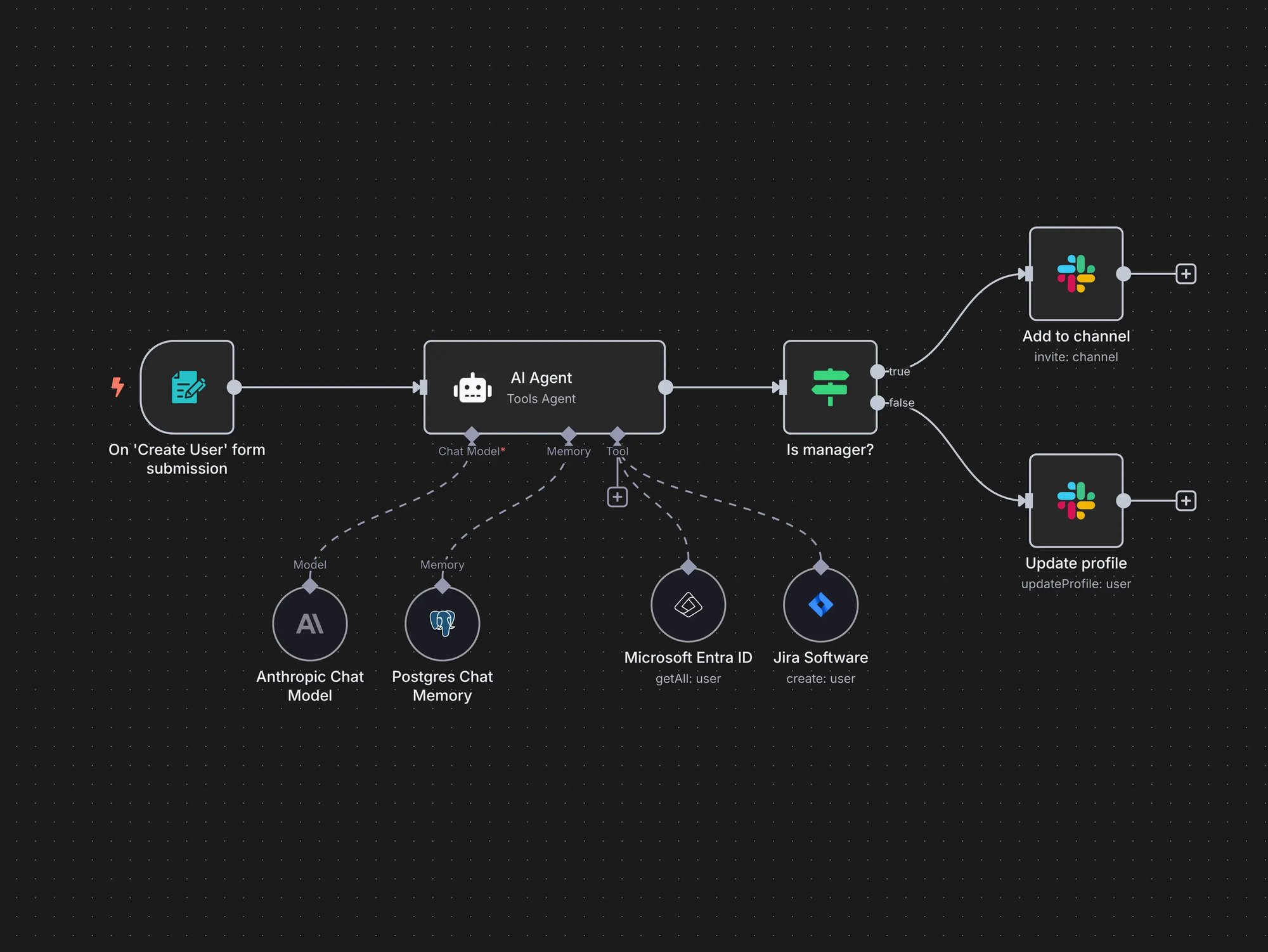
n8n is an open-source automation platform that enables companies to connect applications, automate recurring tasks, and reliably orchestrate even complex business processes — without having to build extensive development resources. The focus is not on individual automations but on end-to-end workflows that meaningfully link systems, data, and teams.
What sets n8n apart from many other automation solutions is the high degree of control and flexibility. The platform is self-hostable, avoids vendor lock-in, and can be deeply customized to individual requirements. Especially for companies with high demands for data protection, integration freedom, and long-term scalability, this is a decisive advantage.
Accordingly, more and more companies are choosing n8n to use automation not as a short-term efficiency fix but as a strategic foundation for digital processes. Beyond cost control, transparency over data flows, adaptability of existing workflows, and independence from rigid licensing models play a central role.
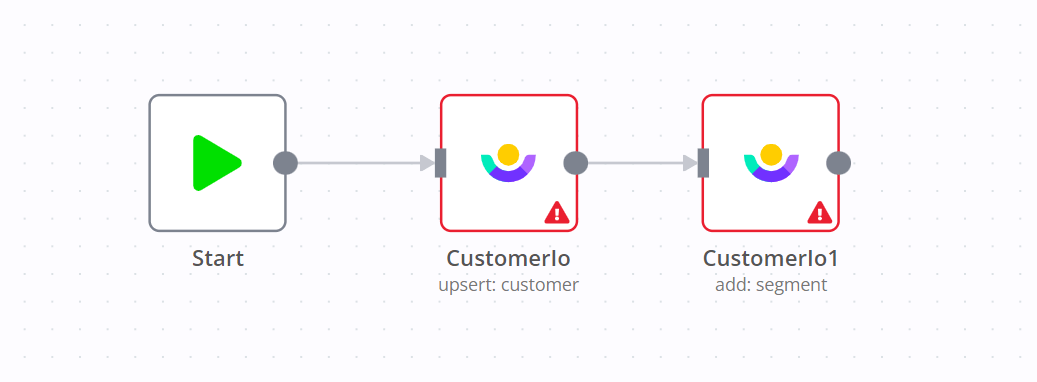
Technically, n8n is based on a clear, easy-to-follow workflow principle. Every workflow starts with a Trigger — an event that initiates the process. This is followed by Actions that execute specific tasks, as well as Operators that filter, transform, or logically process data. These modular building blocks, known as n8n nodes, can be flexibly combined and form the foundation for stable, extensible automations.
Top 15 Business-Driven n8n Workflows
In practice, we consistently see that automation doesn't fail due to a lack of tools but rather due to unclear processes and organically grown structures. Data is maintained in multiple places, handoffs are manual, and many workflows depend on individual people. This is exactly where the following n8n workflows come in.
We selected these automations because they have proven themselves across various projects. They are not specialized solutions but workflows that regularly occur in everyday operations — in marketing teams, in sales, in e-commerce, and in internal processes. When properly implemented, they run stably in the background and noticeably relieve teams.
1. Automated Lead Capture and Routing
Many companies capture leads through various channels — such as website forms, LinkedIn, or landing pages. Without centralized automation, manual effort quickly arises in routing and processing.
How It Works
An n8n workflow automatically receives incoming leads via webhook or HTTP request, validates the data (e.g., by region, area of interest, or source), enriches it if necessary, and routes it directly to the responsible team member or system — for example, via a CRM interface or a notification.
Features
- Receiving leads through multiple channels (e.g., forms, ads, APIs)
- Data validation and enrichment (e.g., lead scoring, email domain verification)
- Automatic routing to CRM or sales team
- Notifications via email, Slack, etc.
- Logging and optional audit trails
Business Benefit
Faster response times, fewer manual handoffs, and fully documented lead processing. Especially with high lead volumes or distributed teams, coordination effort is significantly reduced — and no contact is lost.
2. Automated Order Processing in E-Commerce
As order volume increases, manual processes quickly reach their limits. Orders are not processed on time, inventory levels are inaccurate, customers receive delayed feedback — or none at all. Gaps frequently emerge, particularly in the interaction between the shop, warehouse, and shipping.
How It Works
The workflow automatically receives incoming orders via a shop integration (e.g., Shopify, WooCommerce, or Magento), validates the order data, and then triggers subsequent processes: inventory reconciliation, order confirmation, shipping notification — and if necessary, error handling for faulty orders. Each step is systematically processed without any manual intervention required.
Features
- Integration with shop systems via API or webhook
- Automatic reconciliation with inventory databases
- Sending confirmation and status emails
- Error handling for incomplete or faulty orders
- Handoff to logistics tools or ERP systems possible
Business Benefit
End-to-end automation reduces manual effort and minimizes typical error sources in order processing. Customers receive faster feedback, processes remain traceable — and the fulfillment team gains time, especially during high volumes or seasonal fluctuations.
3. Automating Document and Contract Processes
Contracts, proposals, or other business documents are still created by hand in many companies, sent via email, and manually tracked. This often results in lost time and oversight — especially when multiple stakeholders are involved or certain deadlines must be met.
How It Works
The workflow starts with creating a document from a template — for example, for a contract or proposal. Customer data or contract details can be automatically inserted. The document is then forwarded to the responsible parties for review or signature. Signatures are collected via integrated e-signature services, and the finished document is stored centrally. Reminders for open or soon-to-expire documents are sent automatically.
Features
- Automatic document generation from templates
- Integration with e-signature tools (e.g., DocuSign, SignRequest)
- Routing to internal or external approval processes
- Reminders for pending items or deadline expirations
- Central storage and structured archiving
Business Benefit
Contracts and documents can be created faster, edited in an audit-proof manner, and completed on time. Teams save themselves the manual tracking of individual steps while maintaining full oversight at all times. This reduces error sources and noticeably accelerates processes — especially in legally relevant areas.
4. Real-Time Synchronization of CRM Data
In many companies, multiple systems store or process customer data — from newsletter tools to ERP systems. Data is often maintained, updated, or supplemented in several places. This inevitably leads to inconsistencies: different address data, missing information, duplicate entries. In day-to-day operations, this is not only frustrating but also risky — for instance, when preparing proposals, handling inquiries, or managing support cases.
We work with workflows that automatically propagate changes from one location to all connected systems — without delay and without manual exports. New contacts, updated master data, or status changes in the sales process stay current everywhere, regardless of who made the change.
What we particularly value about this: it reduces silent error sources, saves coordination effort, and builds trust in the data landscape. Especially for decentralized teams or international setups, clean synchronization is often worth more than the next reporting tool.
5. Centralized Marketing Asset Management
When multiple teams work on campaigns, many versions of images, texts, or presentations quickly emerge. Without a central structure, files are created in duplicate, outdated assets are used, or approvals are delayed — especially when external partners are involved.
How It Works
An n8n workflow captures new assets, automatically assigns them to the appropriate project or channel, and tags them with metadata (e.g., topic, format, approval status). Files can be integrated via cloud storage and, depending on status, automatically approved, archived, or flagged for editing. Approvals, comments, or handoffs to other tools can also be integrated.
Features
- Automatic assignment and tagging of marketing assets
- Integration with cloud storage (e.g., Google Drive, Dropbox, S3)
- Status tracking: "In Review," "Approved," "Outdated"
- Automated handoffs to other systems (e.g., CMS or ad platforms)
- Scheduled publishing or archiving
Business Benefit
Less coordination effort, clearer version management, and a central overview of all assets in use. This saves time in production, prevents errors in live deployment, and facilitates collaboration — both internally and externally.
6. Social Media Planning and Publishing
Many marketing teams plan content in spreadsheets or calendar tools — then publish manually, often under time pressure. This leads to errors, irregular publishing, or media that isn't prepared for specific platforms.
How It Works
An n8n workflow takes content from a central editorial calendar or content repository, prepares it, and publishes it on a scheduled basis to the respective platforms — e.g., LinkedIn, Instagram, X (formerly Twitter), or Facebook. Alternatively, the workflow can also just prepare content and hand it off for manual approval.
Features
- Scheduled publishing via API connections to social media platforms
- Integration with editorial calendars (e.g., Google Sheets, Notion, Airtable)
- Support for content templates, image uploads, and link tracking
- Platform-differentiated distribution of posts (e.g., text lengths, hashtags)
- Optional notifications before publishing
Business Benefit
Planning and publishing can be decoupled — making the entire social media process calmer, more consistent, and better scalable. Campaigns can be prepared in advance and automatically deployed without relying on individual actions. This is especially relieving for smaller teams with high output frequency.
7. AI-Powered Content Creation and Distribution
Especially with regular content needs — such as for blogs, newsletters, or product texts — the question arises how editorial teams can be relieved without sacrificing quality. Many companies want to integrate AI meaningfully but don't know how to efficiently map the transition from idea to text to publication.
How It Works
The workflow connects n8n with an AI text model (e.g., OpenAI), receives content from an editorial plan (topics, formats, target audiences), and generates initial drafts based on templates. This content can be automatically handed off for review, manually refined if needed, and then fed into CMS, newsletter tools, or content databases.
Features
- Integration of GPT-based text models
- Use of predefined content templates
- Combination of automatic generation and manual review loops
- Publishing or routing to CMS, HubSpot, Webflow, etc.
- Version management or feedback loops possible
Business Benefit
Editorial work is not replaced but structurally supplemented: repetitive content such as product descriptions, event announcements, or email variants can be prepared significantly faster. At the same time, quality is secured through targeted review points. Especially at high frequency or with small teams, this creates noticeable relief.
8. Automated Inventory Monitoring and Reordering
In many companies, inventory monitoring is still done manually or through irregular exports. Products unexpectedly run out, reorders come too late — or too much is ordered because no precise thresholds are defined. This quickly becomes unmanageable, especially in e-commerce or with multiple warehouses.
How It Works
The workflow monitors inventory data regularly or in real time — for example, via a direct connection to the warehouse database or an ERP system. As soon as a defined minimum stock level is reached, an order is automatically prepared or placed directly with the supplier. Depending on the setup, approval levels, priorities, or tiered quantities can also be mapped.
Features
- Monitoring of threshold values for individual products
- Integration with warehouse or ERP systems (e.g., Odoo, SAP, Airtable)
- Automatic creation of order suggestions or purchase orders
- Escalations or reminders for critical stock levels
- Supplier communication via email, API, or file export
Business Benefit
Inventory levels reliably stay on target without daily manual checks. This prevents supply bottlenecks, reduces tied-up capital costs, and improves planability — especially for seasonal products or products with high turnover rates.
9. Project and Task Reminders
Project plans are often well structured — but execution fails because deadlines slip out of sight or tasks aren't initiated on time. Especially with longer project timelines or distributed teams, a functioning reminder mechanism is often missing.
How It Works
An n8n workflow regularly checks project or task lists (e.g., from tools like Trello, Asana, Notion, or Google Sheets) and compares due dates or statuses. As soon as deadlines approach or tasks remain unprocessed for too long, reminders are automatically sent — via email, Slack, or directly into the PM tool. Recurring tasks can also be automatically triggered this way.
Features
- Connection to project tools or databases via API
- Time-based triggers for deadlines, statuses, or inactivity
- Personalized notifications based on role or responsibility
- Escalation levels (e.g., for overdue tasks)
- Integration with calendars or meeting scheduling possible
Business Benefit
Projects run more structured without someone having to constantly follow up. Deadlines are reliably met, tasks stay in flow — even when the team works remotely or manages multiple projects in parallel. This reduces everyday stress and improves planability.
10. Personalized Email Campaigns
Many email campaigns are still sent to broad distribution lists — regardless of interests, behavior, or previous contact. The result: low open rates, high unsubscribes, and wasted potential in customer communication.
How It Works
An n8n workflow segments recipients based on behavioral data, CRM fields, or external triggers. Content is dynamically populated using templates — for example, with the matching product, name, or topic — and sent at the individually optimal time. Feedback (e.g., clicks, replies, conversions) flows back into the next campaign cycle.
Features
- Automatic segmentation by user behavior, CRM status, or interests
- Dynamic content insertion (e.g., name, product suggestion, offer)
- Send-time optimization (e.g., based on open behavior)
- Integration with email tools like Mailchimp, Brevo, HubSpot, or SMTP
- Return channel analysis for campaign evaluation
Business Benefit
Emails are sent more targeted, more relevant, and at the right time — improving open, click, and conversion rates. At the same time, effort decreases as content is automatically assembled and recipients dynamically selected. This enables scalable campaigns without losing quality.
11. Automated Data Backup and Synchronization
Whether customer data, reports, or configuration files — many teams back up data either manually or not regularly at all. Reliable data backups, consistent data management, and data storage across systems are essential to prevent outages or data loss.
How It Works
An n8n workflow is triggered on a schedule or by specific events. It copies relevant data from a source (e.g., database, cloud drive, web app) to a second system or stores backups in a structured format. Rules for data cleansing, versioning, or error handling can also be integrated.
Features
- Scheduled or event-based backup of files or database entries
- Synchronization between different storage locations (e.g., S3, Google Drive, FTP, SQL)
- Versioning and legacy data management
- Error detection and logging
- Automatic sending of backup reports
Business Benefit
Data is reliably available even in the event of system failures or accidental deletions. At the same time, automation saves time, reduces manual errors, and increases data security — especially for sensitive or business-critical information.
12. Incident Management and Ticket Creation
When technical disruptions occur or customers need support, every minute counts. In many companies, however, the path from the initial report to processing is not standardized: incidents are reported via email, forwarded internally, or left unstructured in the system.
How It Works
An n8n workflow responds to defined triggers — for example, error messages from a monitoring system, support forms, or incoming emails — and automatically creates a ticket in the appropriate system (e.g., Jira, Zendesk, Freshdesk). Depending on urgency, the ticket is prioritized, routed to the right team, and enriched with additional information if needed. Status updates or escalations can also be integrated.
Features
- Automatic ticket creation for system errors, form submissions, or emails
- Prioritization by content, severity, or channel
- Connection to common ticketing systems (e.g., Jira, Zendesk, HubSpot Service Hub)
- Routing to responsible individuals or teams
- Optional: status updates, escalation levels, SLAs
Business Benefit
Incidents are detected, captured, and resolved faster. Responsibilities are clearly defined, no case is lost — and response times can be reliably maintained. Especially with high support volumes or critical technical systems, this is a real advantage.
13. CI/CD Triggers and DevOps Automations
In modern development teams, automation is a central component of deployment. Yet we often see that important steps — such as tests, deployments, or notifications — are triggered manually or run inconsistently. Especially in growing teams, this leads to delays and unnecessary risks.
How It Works
An n8n workflow is triggered by events in the code repository (e.g., push, merge, or pull request) or by schedules. Depending on the project, a test pipeline is automatically started, the result is logged, feedback is sent to developers, or a deployment process is initiated. Notifications to teams or tools (e.g., Slack, email, PagerDuty) run in parallel.
Features
- Connection to Git-based systems like GitHub, GitLab, Bitbucket
- Automatic trigger on code events (e.g., push, tag, merge)
- Execution of build, test, or deployment commands via SSH, API, or CLI
- Status updates and notifications for development teams
- Error logging and alerting on build failures or deployment errors
Business Benefit
Fewer manual interventions, clearer workflows, and significantly more reliability in delivery. Errors are detected early, response times shortened — and collaboration within the dev team measurably improves, especially with frequent releases or parallel feature branches.
14. Automated Customer Onboarding Processes
Good onboarding often determines whether new customers remain active or drop off. Yet many onboarding processes still run manually: emails are sent individually, information is provided too late, or important steps are simply forgotten.
How It Works
An n8n workflow is triggered as soon as a new customer is registered in the system — for example, through a completed purchase, a CRM update, or a form entry. From this point, a sequence of defined steps is automatically initiated: welcome email, access to relevant materials, scheduling a first meeting, and later follow-ups. Surveys or feedback requests can also be integrated into the flow.
Features
- Automatic start upon new customer entry in CRM or shop system
- Sending onboarding emails (e.g., welcome, help articles, video tutorials)
- Integration of calendar tools for appointment booking
- Task creation for internal teams (e.g., account setup, contract review)
- Scheduled follow-up communication and feedback collection
Business Benefit
Customers are reliably, structurally, and traceably guided through their first steps — regardless of who is internally available at the time. This strengthens customer retention, reduces follow-up inquiries, and ensures a consistent first impression, even during rapid growth or changing points of contact.
15. Automated Analysis and Report Generation
Numbers are often available but scattered across different systems and must be manually consolidated. This costs time, leads to errors, and results in reports being created either too late or not at all. Especially with recurring evaluations, this is an unnecessary bottleneck.
How It Works
An n8n workflow collects data from various sources — such as CRM, web analytics, e-commerce systems, or ERP — at fixed intervals or on demand. The data is then aggregated, prepared (e.g., in tables, PDFs, or dashboards), and sent to the responsible individuals or teams. Anomalies can also be detected and reported — such as unusually low revenue or sudden traffic spikes.
Features
- Connection to tools like Google Analytics, HubSpot, SQL databases, Google Sheets, etc.
- Scheduled or manual triggers (e.g., weekly reports, monthly evaluations)
- Automatic formatting, filtering, and visualization of data
- Distribution via email, Slack, cloud storage, or direct dashboard integration
- Alert function for defined thresholds or deviations
Business Benefit
Recurring reports are reliably created and distributed — without anyone having to export spreadsheets or manually consolidate data. This increases transparency, saves time, and ensures that relevant information arrives where it's needed — regularly, consistently, and traceably.
Comparison: Which Departments Benefit from Which Workflows
| Automation Type | Marketing | Sales | IT | Customer Service |
|---|---|---|---|---|
| 1. Lead Capture & Routing | High | High | Low | Medium |
| 2. E-Commerce Order Processing | Medium | High | Medium | High |
| 3. Document & Contract Processes | Medium | High | Medium | Medium |
| 4. Real-Time CRM Data Synchronization | High | High | Medium | Medium |
| 5. Marketing Asset Management | High | Medium | Low | Low |
| 6. Social Media Planning & Publishing | High | Low | Low | Low |
| 7. AI-Powered Content Creation | High | Medium | Low | Low |
| 8. Inventory Monitoring & Reordering | Low | Medium | Medium | Medium |
| 9. Project & Task Reminders | Medium | Medium | Medium | Medium |
| 10. Personalized Email Campaigns | High | Medium | Low | Medium |
| 11. Data Backup & Synchronization | Low | Low | High | Medium |
| 12. Incident Management & Ticket Creation | Low | Low | High | High |
| 13. CI/CD Triggers & DevOps Automations | Low | Low | High | Low |
| 14. Customer Onboarding Processes | Medium | High | Low | High |
| 15. Analysis & Report Generation | High | Medium | Medium | Medium |
Best Practices for Implementing n8n Automations
The technical capabilities of n8n are versatile — but long-term success depends on how cleanly and maintainably workflows are built. In practice, we consistently see that seemingly small automations quickly gain complexity. This makes a solid foundation all the more important.
Error Handling
Workflows should fundamentally be built to remain stable even when problems occur. We recommend working deliberately with error-handling nodes and fallback logic — for example, in case an API is unreachable or an expected value is missing. Errors should not only be caught but also documented so that root causes can be traced later.
Documentation
Especially with growing automation landscapes, it's important that every automation is clearly documented — including triggers, logic, and data flows. This not only facilitates handoffs to other team members but also saves time during maintenance or expansion. We recommend maintaining documentation directly within the workflow or through supplementary internal knowledge bases.
Testing
New workflows should not be tested directly in the production system. An isolated test or staging setup helps identify problems early and protect real data. Especially with integrations to third-party systems, this prevents faulty data from being transferred or processes from being accidentally triggered multiple times.
Monitoring
Especially for business-critical processes, it's important to keep track of the status of running workflows. n8n enables the setup of notifications or logging for errors, outages, or defined events. We recommend building central logs or dashboards through which all relevant processes can be monitored.
Scalability
Workflows should be built modularly — meaning that individual parts can be reused or exchanged. This facilitates further development and ensures that even with growing demand, you don't have to start from scratch. Small, logically separated workflows are easier to maintain than large, monolithic processes.
Steps for a Clean Implementation
- Identify repetitive processes that are suitable for automation
- Plan workflow logic and integrations — without implementing everything at once
- Develop and test workflows step by step
- Document every step — including exceptions and edge cases
- Set up live monitoring and observe and optimize processes in operation
Common Mistakes That Can Be Avoided
- Workflows are built too complex — without a clear structure or description
- Error handling and monitoring are missing — until the first outage occurs
- Automations are not maintained or further developed, even though business processes change
Future-Proof E-Commerce and CRM Integrations
System landscapes change: platforms receive updates, APIs change, authentication methods are renewed, or new tools are added. Anyone who wants to run automation stably in the long term needs more than functioning workflows: it's about building integrations that are still viable in six months or two years.
Actively Use API Versioning
Many platforms provide new features through versioned APIs, while older versions are eventually deprecated. We recommend always working with a clearly defined, stable API version. This avoids sudden breaks from platform updates. In n8n, version paths can often be configured directly in the HTTP request node or the connector being used.
Build Workflows Modularly
Instead of developing large, hard-to-maintain processes, we rely on modular building blocks: small, clearly defined workflows that can be specifically called or reused. This not only simplifies debugging but also makes later extensions or technological transitions significantly easier.
Transform Data Deliberately
Different systems expect different formats — whether for dates, field names, or data structures. To avoid errors, we recommend using transformation and mapping nodes: this allows data formats to be standardized, cleanly handed off, and structured appropriately for the target systems.
Secure Access Management
Especially with integrations involving customer data, authentication plays a central role. Our recommendation: never store credentials and tokens directly in the workflow, but manage them via centralized environment variables. Additionally, credentials should be rotated regularly and separated by role (e.g., read vs. write access).
Plan for Backups and Failover
Even the best workflow can fail — whether due to a timeout, an API outage, or a faulty input date. That's why we recommend planning regular backups and implementing simple failover logic for critical processes: for example, a retry on error or caching important information intermediately.
Our Approach at W4
We don't develop integrations for a snapshot in time but with the goal that they remain scalable, maintainable, and viable in the long term. Especially with e-commerce and CRM applications, we ensure that architecture, data security, and extensibility are considered early — before the first line of workflow logic is written.

Security, Data Protection, and Compliance in n8n Workflows
Automation simplifies many processes but also introduces new requirements for secure data handling. Especially with sensitive information, personal data, or system-critical processes, it's essential to set up workflows in a data-protection-compliant and secure manner from the start.
Data Encryption
Sensitive information should be encrypted both during transmission and in stored form. This applies not only to personal data but also to internal system credentials, tokens, or financial data. n8n enables connections via HTTPS and secure storage of sensitive content through encrypted environment variables.
Strong Authentication
All external connections — e.g., to CRM, ERP, or third-party providers — should be connected via secure authentication methods. This includes OAuth2, API tokens with limited validity, and role-based access controls. Access to the n8n interface itself should also be protected through secure passwords, two-factor authentication, and restricted user roles.
Data Protection and Legal Requirements
Workflows that handle personal data must comply with applicable regulations such as the GDPR. This includes rules on data storage, data minimization, deletion deadlines, and consent. In practice, this means: don't store data longer than necessary, traceably document where it flows — and regularly review automated processes for their relevance.
Logging and Traceability
Especially in regulated environments or with internal audit requirements, it's important to make workflows transparent. This means: traceable logs, documented data flows, and the ability to track changes to workflows or data. n8n provides central logs for this purpose and can be combined with external monitoring tools.
Access Control
Not all users should have full access to all workflows or sensitive configurations. It's advisable to clearly define roles and permissions: Who may only execute workflows? Who may edit them? Who may connect new data sources? A clean role distribution increases security and reduces the risk of unintentional changes.
Security Checklist for n8n Deployments
- Enable HTTPS: For all endpoints, especially for webhooks and external access
- Regular updates: Keep n8n itself and all dependent components up to date
- Use environment variables: Never store sensitive credentials in plain text
- Restrict access: Make the n8n instance accessible only to authorized individuals
- Monitor logs: Detect suspicious activity early — ideally with external logging or alerting
Enabling Growth with the Right Automations
Automation is not an end in itself. Used correctly, it creates space for focused work, reduces manual burden, and enables companies to build scalable processes — without operational complexity becoming a growth bottleneck.
n8n provides a flexible technological foundation for this. The platform can be connected to existing systems, individually extended, and integrated into the organization step by step. Whether in sales, support, operations, or marketing automation: workflows can be deployed precisely where they provide noticeable relief — and grow along as requirements change.
Our Experience — Your Advantage
As a digital agency with many years of experience in process automation, we help companies not only technically implement n8n but deploy it strategically. We analyze processes, develop modular workflows, and ensure that automation works in everyday operations — and stays working.
If you're thinking about automating recurring workflows or connecting existing systems more efficiently, talk to us. We'll show you where getting started pays off — and how a scalable architecture can emerge from it.
Questions Our Clients Frequently Ask About n8n
How do I get started with n8n automations in my company?
It always starts with a simple question: Which processes regularly cost us time without adding real value? Whoever identifies these recurring processes has already taken the most important step.
Our recommendation: Start with a concrete use case — such as lead routing, email automation, or data synchronization between systems. n8n offers many templates for this that can be easily customized.
Do you need technical know-how to work with n8n?
A basic understanding of APIs, data structures, and workflows helps — but doesn't need to be at developer level. n8n's visual interface is deliberately designed so that non-technical users can also build workflows.
For more complex processes, authentication, or error scenarios, however, we recommend involving IT or agency expertise — especially when security and scalability are important.
How does n8n differ from tools like Zapier or Make (Integromat)?
n8n is primarily aimed at companies that need more control:
- It is self-hostable
- Can be fully customized
- Is not subject to strict usage limits like other tools
Especially with sensitive data, complex interfaces, or specific requirements, this is a decisive advantage — particularly in the European legal context or with data protection matters.
What results can I expect from automation with n8n?
In our projects, we typically see measurable results after 3 to 6 months:
- Fewer manual errors
- Faster throughput times
- And more time for value-adding tasks within the team
Especially for processes with high volume — such as lead processing, orders, reporting, or ticketing — the investment pays off quickly.